How to Solve AWS WAF in Crawl4AI with CapSolver Integration

Ethan Collins
Pattern Recognition Specialist
Introduction
Amazon Web Services (AWS) Web Application Firewall (WAF) is a powerful security service that helps protect web applications from common web exploits that could affect availability, compromise security, or consume excessive resources. While crucial for safeguarding web assets, AWS WAF can present a significant challenge for automated web scraping and data extraction processes, often blocking legitimate crawlers.
This article provides a comprehensive guide on how to seamlessly integrate Crawl4AI, an advanced web crawler, with CapSolver, a leading CAPTCHA and anti-bot solution service, to effectively solve AWS WAF protections. We will detail the API-based and extension integration method, including code examples and explanations, to ensure your web automation tasks can proceed without interruption.
Understanding AWS WAF and its Challenges for Web Scraping
AWS WAF operates by monitoring HTTP(S) requests that are forwarded to an Amazon CloudFront distribution, an Application Load Balancer, an Amazon API Gateway, or an AWS AppSync GraphQL API. It allows you to configure rules that block common attack patterns, such as SQL injection or cross-site scripting, and can also filter traffic based on IP addresses, HTTP headers, HTTP body, or URI strings. For web crawlers, this often means:
- Request Filtering: WAF rules can identify and block requests that appear to be automated or malicious.
- Cookie-Based Verification: AWS WAF frequently uses specific cookies to track and verify legitimate user sessions. Without these cookies, requests are often denied.
- Dynamic Challenges: While not a traditional CAPTCHA, the underlying mechanisms can act as a barrier, requiring specific tokens or session identifiers to proceed.
CapSolver provides a robust solution for obtaining the necessary aws-waf-token cookie, which is key to bypassing AWS WAF. When integrated with Crawl4AI, this allows your crawlers to mimic legitimate user behavior and navigate protected sites successfully.
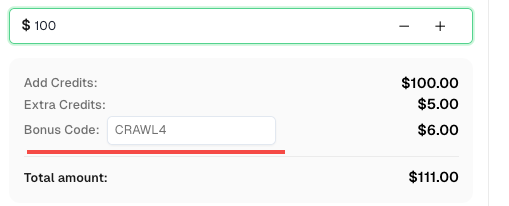
💡 Exclusive Bonus for Crawl4AI Integration Users:
To celebrate this integration, we’re offering an exclusive 6% bonus code —CRAWL4for all CapSolver users who register through this tutorial.
Simply enter the code during recharge in Dashboard to receive an extra 6% credit instantly.
Integration Method 1: CapSolver API Integration with Crawl4AI
The most effective way to handle AWS WAF challenges with Crawl4AI and CapSolver is through API integration. This method involves using CapSolver to obtain the required aws-waf-token and then injecting this token as a cookie into Crawl4AI's browser context before reloading the target page.
How it Works:
- Initial Navigation: Crawl4AI attempts to access the target web page protected by AWS WAF.
- Identify WAF Challenge: Upon encountering the WAF, your script will recognize the need for an
aws-waf-token. - Obtain AWS WAF Cookie: Call CapSolver's API using their SDK, specifying the
AntiAwsWafTaskProxyLesstype along with thewebsiteURL. CapSolver will return the necessaryaws-waf-tokencookie. - Inject Cookie and Reload: Utilize Crawl4AI's
js_codefunctionality to set the obtainedaws-waf-tokenas a cookie in the browser's context. After setting the cookie, the page is reloaded. - Continue Operations: With the correct
aws-waf-tokencookie in place, Crawl4AI can now successfully access the protected page and continue with its data extraction tasks.
Example Code: API Integration for AWS WAF
The following Python code demonstrates how to integrate CapSolver's API with Crawl4AI to solve AWS WAF challenges. This example targets a Porsche NFT onboarding page protected by AWS WAF.
python
import asyncio
import capsolver
from crawl4ai import *


# TODO: set your config
# Docs: https://docs.capsolver.com/guide/captcha/awsWaf/
api_key = "CAP-xxxxxxxxxxxxxxxxxxxxx"              # your api key of capsolver
site_url = "https://nft.porsche.com/onboarding@6"  # page url of your target site
cookie_domain = ".nft.porsche.com"                 # the domain name to which you want to apply the cookie
captcha_type = "AntiAwsWafTaskProxyLess"           # type of your target captcha
capsolver.api_key = api_key


async def main():
    browser_config = BrowserConfig(
        verbose=True,
        headless=False,
        use_persistent_context=True,
    )

    async with AsyncWebCrawler(config=browser_config) as crawler:
        await crawler.arun(
            url=site_url,
            cache_mode=CacheMode.BYPASS,
            session_id="session_captcha_test"
        )

        # get aws waf cookie using capsolver sdk
        solution = capsolver.solve({
            "type": captcha_type,
            "websiteURL": site_url,
        })
        cookie = solution["cookie"]
        print("aws waf cookie:", cookie)

        js_code = """
            document.cookie = \'aws-waf-token=""" + cookie + """;domain=""" + cookie_domain + """;path=/\';
            location.reload();
        """

        wait_condition = """() => {
            return document.title === \'Join Porsche’s journey into Web3\';
        }"""

        run_config = CrawlerRunConfig(
            cache_mode=CacheMode.BYPASS,
            session_id="session_captcha_test",
            js_code=js_code,
            js_only=True,
            wait_for=f"js:{wait_condition}"
        )

        result_next = await crawler.arun(
            url=site_url,
            config=run_config,
        )
        print(result_next.markdown)


if __name__ == "__main__":
    asyncio.run(main())
Code Analysis:
- CapSolver SDK Call: The
capsolver.solvemethod is invoked withAntiAwsWafTaskProxyLesstype andwebsiteURLto retrieve theaws-waf-tokencookie. This is the crucial step where CapSolver's AI solves the WAF challenge and provides the necessary cookie. - JavaScript Injection (
js_code): Thejs_codestring contains JavaScript that sets theaws-waf-tokencookie in the browser's context usingdocument.cookie. It then triggerslocation.reload()to refresh the page, ensuring that the subsequent request includes the newly set valid cookie. wait_forCondition: Await_conditionis defined to ensure Crawl4AI waits for the page title to match 'Join Porsche’s journey into Web3', indicating that the WAF has been successfully bypassed and the intended content is loaded.
Integration Method 2: CapSolver Browser Extension Integration
CapSolver's browser extension provides a simplified approach for handling AWS WAF challenges, especially when leveraging its automatic solving capabilities within a persistent browser context managed by Crawl4AI.
How it Works:
- Persistent Browser Context: Configure Crawl4AI to use a
user_data_dirto launch a browser instance that retains the installed CapSolver extension and its configurations. - Install and Configure Extension: Manually install the CapSolver extension into this browser profile and configure your CapSolver API key. The extension can be set to automatically solve AWS WAF challenges.
- Navigate to Target Page: Crawl4AI navigates to the webpage protected by AWS WAF.
- Automatic Solving: The CapSolver extension, running within the browser context, detects the AWS WAF challenge and automatically obtains the
aws-waf-tokencookie. This cookie is then automatically applied to subsequent requests. - Proceed with Actions: Once AWS WAF is solved by the extension, Crawl4AI can continue with its scraping tasks, as the browser context will now have the necessary valid cookies for subsequent requests.
Example Code: Extension Integration for AWS WAF (Automatic Solving)
This example demonstrates how Crawl4AI can be configured to use a browser profile with the CapSolver extension for automatic AWS WAF solving.
python
import asyncio
import time

from crawl4ai import *


# TODO: set your config
user_data_dir = "/browser-profile/Default1" # Ensure this path is correctly set and contains your configured extension

browser_config = BrowserConfig(
    verbose=True,
    headless=False,
    user_data_dir=user_data_dir,
    use_persistent_context=True,
    proxy="http://127.0.0.1:13120", # Optional: configure proxy if needed
)

async def main():
    async with AsyncWebCrawler(config=browser_config) as crawler:
        result_initial = await crawler.arun(
            url="https://nft.porsche.com/onboarding@6",
            cache_mode=CacheMode.BYPASS,
            session_id="session_captcha_test"
        )

        # The extension will automatically solve the AWS WAF upon page load.
        # You might need to add a wait condition or time.sleep for the WAF to be solved
        # before proceeding with further actions.
        time.sleep(30) # Example wait, adjust as necessary for the extension to operate

        # Continue with other Crawl4AI operations after AWS WAF is solved
        # For instance, check for elements or content that appear after successful verification
        # print(result_initial.markdown) # You can inspect the page content after the wait


if __name__ == "__main__":
    asyncio.run(main())
Code Analysis:
user_data_dir: This parameter is essential for Crawl4AI to launch a browser instance that retains the installed CapSolver extension and its configurations. Ensure the path points to a valid browser profile directory where the extension is installed.- Automatic Solving: The CapSolver extension is designed to automatically detect and solve AWS WAF challenges. A
time.sleepis included as a general placeholder to allow the extension to complete its background operations. For more robust solutions, consider using Crawl4AI'swait_forfunctionality to check for specific page changes that indicate successful AWS WAF resolution.
Example Code: Extension Integration for AWS WAF (Manual Solving)
If you prefer to trigger the AWS WAF solving manually at a specific point in your scraping logic, you can configure the extension's manualSolving parameter to true and then use js_code to click the solver button provided by the extension.
python
import asyncio
import time

from crawl4ai import *


# TODO: set your config
user_data_dir = "/browser-profile/Default1" # Ensure this path is correctly set and contains your configured extension

browser_config = BrowserConfig(
    verbose=True,
    headless=False,
    user_data_dir=user_data_dir,
    use_persistent_context=True,
    proxy="http://127.0.0.1:13120", # Optional: configure proxy if needed
)

async def main():
    async with AsyncWebCrawler(config=browser_config) as crawler:
        result_initial = await crawler.arun(
            url="https://nft.porsche.com/onboarding@6",
            cache_mode=CacheMode.BYPASS,
            session_id="session_captcha_test"
        )

        # Wait for a moment for the page to load and the extension to be ready
        time.sleep(6)

        # Use js_code to trigger the manual solve button provided by the CapSolver extension
        js_code = """
            let solverButton = document.querySelector(\'#capsolver-solver-tip-button\');
            if (solverButton) {
            // click event
                const clickEvent = new MouseEvent(\'click\', {
                    bubbles: true,
                    cancelable: true,
                    view: window
                });

                solverButton.dispatchEvent(clickEvent);
            }
        """
        print(js_code)
        run_config = CrawlerRunConfig(
            cache_mode=CacheMode.BYPASS,
            session_id="session_captcha_test",
            js_code=js_code,
            js_only=True,
        )
        result_next = await crawler.arun(
            url="https://nft.porsche.com/onboarding@6",
            config=run_config
        )
        print("JS Execution results:", result_next.js_execution_result)

        # Allow time for the AWS WAF to be solved after manual trigger
        time.sleep(30) # Example wait, adjust as necessary

        # Continue with other Crawl4AI operations


if __name__ == "__main__":
    asyncio.run(main())
Code Analysis:
manualSolving: Before running this code, ensure the CapSolver extension'sconfig.jshasmanualSolvingset totrue.- Triggering Solve: The
js_codesimulates a click event on the#capsolver-solver-tip-button, which is the button provided by the CapSolver extension for manual solving. This gives you precise control over when the AWS WAF resolution process is initiated.
Conclusion
Integrating Crawl4AI with CapSolver offers a robust and efficient solution for bypassing AWS WAF protections, enabling uninterrupted web scraping and data extraction. By leveraging CapSolver's ability to obtain the critical aws-waf-token and Crawl4AI's flexible js_code injection capabilities, developers can ensure their automated processes navigate through WAF-protected websites seamlessly.
This integration not only enhances the stability and success rate of your crawlers but also significantly reduces the operational overhead associated with managing complex anti-bot mechanisms. With this powerful combination, you can confidently collect data from even the most securely protected web applications.
Frequently Asked Questions (FAQ)
Q1: What is AWS WAF and why is it used in web scraping?
A1: AWS WAF (Web Application Firewall) is a cloud-based security service that protects web applications from common web exploits. In web scraping, it's encountered as an anti-bot mechanism that blocks requests deemed suspicious or automated, requiring bypass techniques to access target data.
Q2: How does CapSolver help bypass AWS WAF?
A2: CapSolver provides specialized services, such as AntiAwsWafTaskProxyLess, to solve AWS WAF challenges. It obtains the necessary aws-waf-token cookie, which is then used by Crawl4AI to mimic legitimate user behavior and gain access to the protected website.
Q3: What are the main integration methods for AWS WAF with Crawl4AI and CapSolver?
A3: There are two primary methods: API integration, where CapSolver's API is called to get the aws-waf-token which is then injected via Crawl4AI's js_code, and Browser Extension integration, where the CapSolver extension automatically handles the WAF challenge within a persistent browser context.
Q4: Is it necessary to use a proxy when solving AWS WAF with CapSolver?
A4: While not always strictly necessary, using a proxy can be beneficial, especially if your scraping operations require maintaining anonymity or simulating requests from specific geographic locations. CapSolver's tasks often support proxy configurations.
Q5: What are the benefits of integrating Crawl4AI and CapSolver for AWS WAF?
A5: The integration leads to automated WAF handling, improved crawling efficiency, enhanced crawler robustness against anti-bot mechanisms, and reduced operational costs by minimizing manual intervention.
References
More
AWS WAFApr 21, 2026
AWS WAF vs Cloudflare: CAPTCHA Solving for Automation (2026 Guide)
Compare AWS WAF vs Cloudflare CAPTCHA challenges. Learn how to solve AWS WAF and Cloudflare Turnstile for web automation with high success rates using CapSolver.

AWS WAFApr 14, 2026
Finding the Most Cost-Effective AWS WAF Solver | Pricing, Performance & Optimization Guide
Looking for a cheap AWS WAF solver per thousand requests? Compare pricing, speed, and accuracy to find the best value for your automation needs.